CWSTATION QSL: SOFTWARE INCLUDED FREE IN THE CWSTATION v.16
CWSTATION QSL turns your station log into a living showcase. It reads your logbook, then automatically presents every contact (QSO) one after the other: callsign, operator name, city, country, band, mode, date and time, the distance from your station and the exact position of the correspondent on an interactive world map. For every contact you can open a printable QSL card, load the picture of the QSL card you actually received, or have the program download all your received eQSL cards for you.
VIDEO CONNECT FEATURE
Thanks to this fantastic feature, you can stream video with up to 4 other amateur radio operators, allowing you to conduct voice or telegraphy (CW) contacts while viewing a real-time video feed of your correspondents. Imagine having a QSO with a distant station via HF propagation: if the other operator is also using the CWSTATION software, you can activate this feature to see their radio station.
Decode telegraphy, control the radio, and transmit in CW and voice—all in a single window.
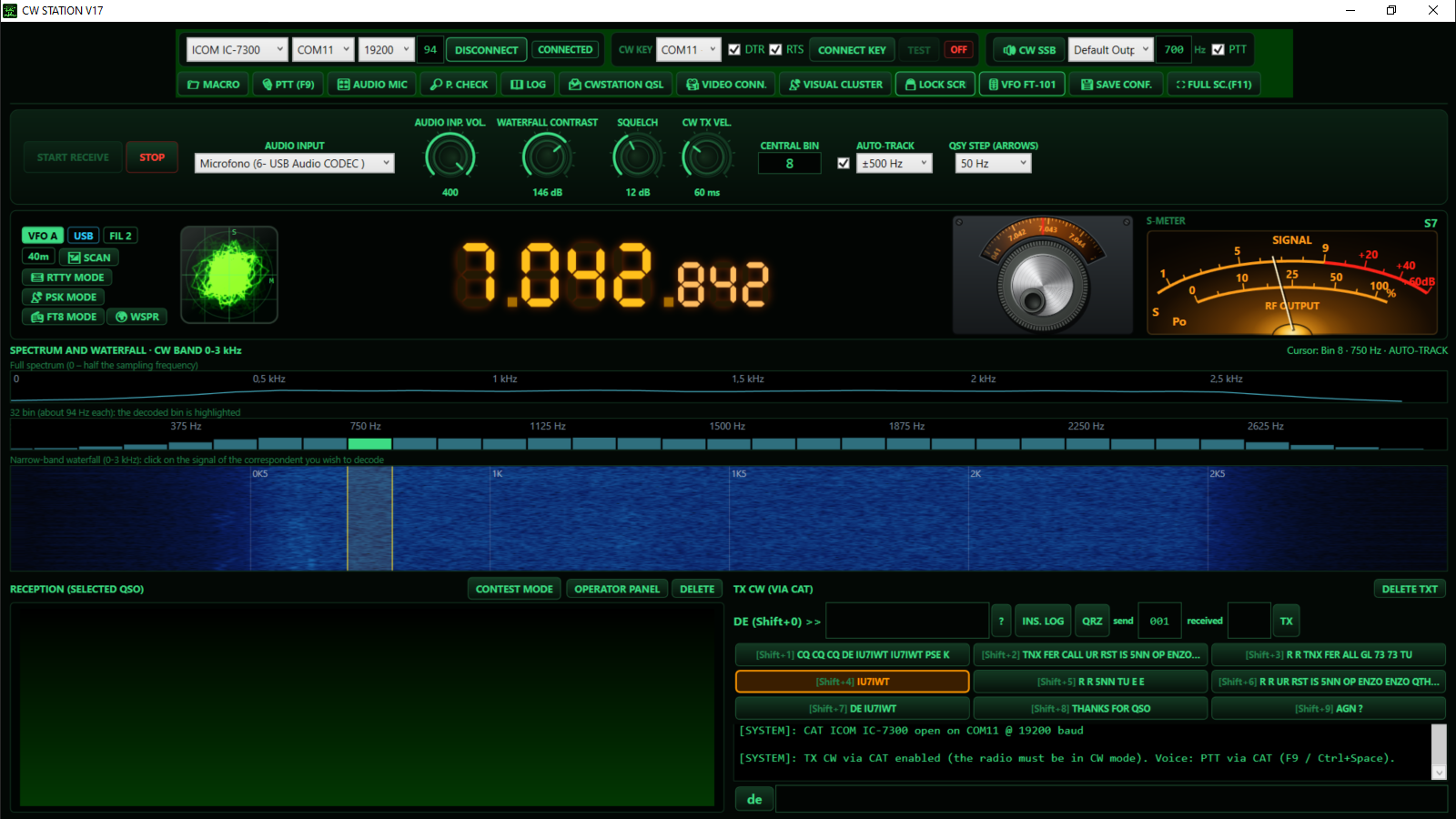
CWSTATION decodes telegraphic signals received via radio, controls Icom, Yaesu, and Kenwood transceivers via CAT, and enables transmission using macros and your computer keyboard. QSO logs are generated automatically in both Cabrillo and ADIF formats simultaneously. Log statistics and a QSO map are also available.With the full version of the software, you can create your own QSL card and send it automatically via Gmail. Furthermore, you can utilize audio routing—complete with a 10-band parametric equalizer and a compressor—for voice operations. A new "visual cluster" feature allows you to view and instantly tune into stations reported on the cluster, leveraging the radio's CAT interface. CWSTATION can also transmit telegraphy without using CAT control; in fact, by selecting the appropriate option, you can output the telegraphy tone through your chosen audio port and trigger your radio's VOX function. A scan function is available for probing a frequency band or a specific portion of the spectrum in search of signals, complete with an option to tune in to a selected signal.
Read the manual in PDF format. Secure payment via PayPal. For Windows 8-10-11 64 bit. Decoding works even without a radio connected, using only the audio..
What it does, in detail
Each function below is included in the program and described in the PDF manual that comes with your purchase.
CW decoding with instant readout
Click on the signal in the waterfall and the text appears letter by letter. The decoder follows speeds from 5 to 40 WPM and if the correspondent moves in frequency, the auto-track follows it.
Spectrum and waterfall with 96 bins
Full spectrum, 96-bin window, and waterfall display, with controls for volume, contrast, and squelch. The noise-reduction filter displays text only when the signal is genuinely CW.
Radio control via CAT
Displays frequency, mode, filter, and bandwidth; features an analog needle-type S-meter with a transmit power scale. Frequency tuning is performed via the VFO knob (in the style of the TS-520 or FT-101) or using arrow keys, with selectable tuning steps ranging from 10 Hz to 1 kHz.
Telegraphic transmission
Start typing, and every character is transmitted immediately. There are nine macros available via Shift+1–9; your call sign and "DE" can be sent with a single key press, and the DELETE key stops everything. You can interface with the radio’s built-in keyer via CAT, or use a second COM port to key the transmitter using the DTR or RTS signals.
Voice without VOX with auto cat PTT
PTT is handled via CAT: the F9 key toggles it, while holding down Ctrl+Space acts as "push-to-talk." The microphone audio processor features a 10-band parametric equalizer, a compressor, and volume control.
Log cabrillo and adif with statistics, QRZ e Partial Check
INS. LOG records the QSO in Cabrillo and adif format, including statistics and map, the UTC time, frequency in kHz, and sequential serial numbers. Pressing Shift+Enter opens the call sign on QRZ.com. If you load an .scp file, the "Partial Check" feature will auto-complete call signs as you type.
Visual cluster funcion
With the "visual cluster" feature, you can view a list of spots categorized by frequency and mode. For any spotted call sign, you can perform an auto-tune to the corresponding station's frequency and mode.
Digital Mode: RTTY, BPSK, FT8, FT4, FT2 , WSPR
You will be able to operate using the most widely used digital modes: RTTY, BPSK (all modes), FT8, FT4, FT2, and WSPR.
Contest Mode
With the "contest mode" window active, you can select your contest and view real-time statistics, with the various callsigns (QRZs) marked along the frequency scale for the band you are currently operating on.
Everything is remembered
SAVE CONFIG saves radio settings, ports, knobs, and macros to a text file, which the program reloads upon startup. The built-in CW vocabulary corrects abbreviations, Q-codes, and common words—including those in Italian.
Supported radios
Four CAT dialects: Icom CI-V, modern Yaesu, 5-byte Yaesu, and Kenwood. The baud rate must match the one set in the radio's menu.
Icom
17 models plus generic CI-V
IC-7300, 7610, 705, 9700, 7100, 7851, 7800, 7700, 7600, 7410, 7200, 7000, 9100, 756PRO III, 746PRO, 706MKIIG, 718
Yaesu
14 models
FT-2000, FTDX-5000, FTDX-3000, FTDX-1200, FT-950, FT-450D, FT-991A, FT-891, FT-710, FTDX-10, FTDX-101D/MP, FT-817, FT-857D, FT-897D
Kenwood
7 models
TS-590S/SG, TS-890S, TS-990S, TS-480HX/SAT, TS-2000, TS-870S, TS-570D/S, TS-450 (WITH INTEFACE)
CW operation via CAT command is not available on the FT-817/857/897, IC-756PRO III, IC-746PRO, IC-706MKIIG, and IC-718. With these radios, CW transmission is performed using a second COM port (DTR/RTS), while the CAT interface remains active for frequency, S-meter, and PTT functions.
Ready in three steps
- Connect the radioChoose the model, COM port and baud rate, then press Connect. If you just want to decode, you can skip this step.
- Start listeningSelect the radio's sound card and click on the signal in the waterfall: the text arrives in the Reception box.
- Reply with a CWEnter the call sign, then press Enter or a macro. At the end of the QSO, click on INS. LOG..
Purchase CWSTUDIO
One payment, the complete program. Pay via PayPal and receive the program and manual in PDF format by email.
- Complete program for Windows 8-10-11 64 bit
- User manual in PDF, 8 pages (read it now)
- Decoding, CAT control, CW transmission, voice, and Cabrillo and adif logging
- Email support: amministrazione@curiositaastronomiche.it
Frequently Asked Questions
Do I need to have the radio connected to the PC?
No. To decode, all you need is an audio input with the signal from the receiver. The CAT connection is used for frequency, S-meter, frequency tuning, PTT, and CW transmission via CAT.
How do I transmit in CW with my radio?
In two ways: using the radio's internal keyer, controlled via CAT, or with a second COM port whose DTR or RTS signals act as the key. The radio must be in CW mode.
What do I receive after payment?
An email with the link to download the program and the manual. Check your spam folder as well. For any issues, write to amministrazione@curiositaastronomiche.it.
Can I try it before buying?
Yes, there is a demo that works for 7 days from installation. Download it from the demo page.
Does it work with my radio?
Check the list in the Radio section. If your Icom is not listed, there is a "Generic CI-V" option where you can manually enter the CI-V address.
Which operating systems does it work on?
It is a program for Windows 8-10-11 64 bit.
Video Tutorials & Demonstrations
Explore CWSTATION v.16 in action across 11 demonstration videos.